Benefeature logo
Benefit Ratings

Benefit Rating Intelligencethrough the Employee Lens

Glassdoor employee ratings and reviews, matched to tens of thousands of employer profiles next to plan data, broker history, per-product premium, participation, retirement, and contacts.

Employee perception, built into the opportunity.
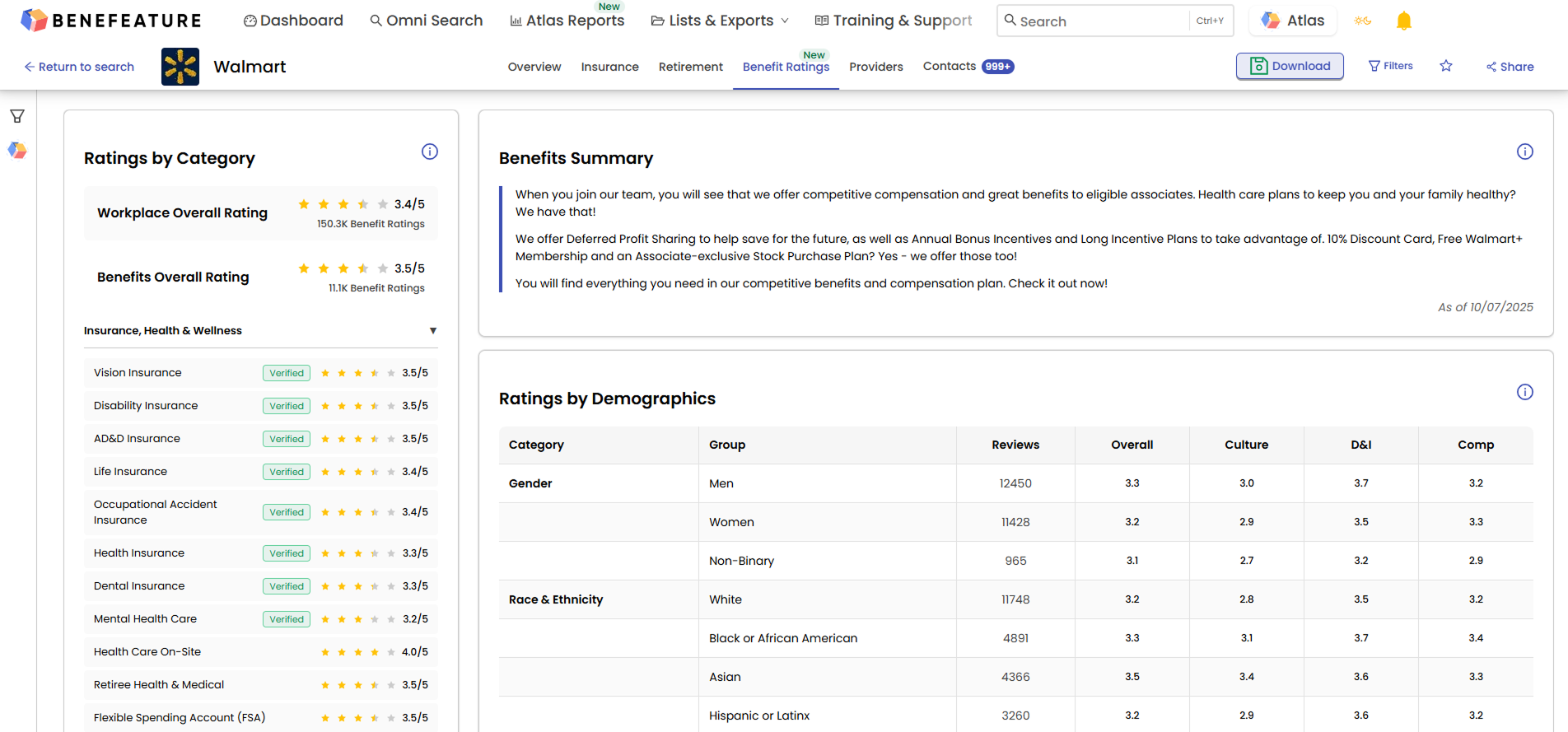
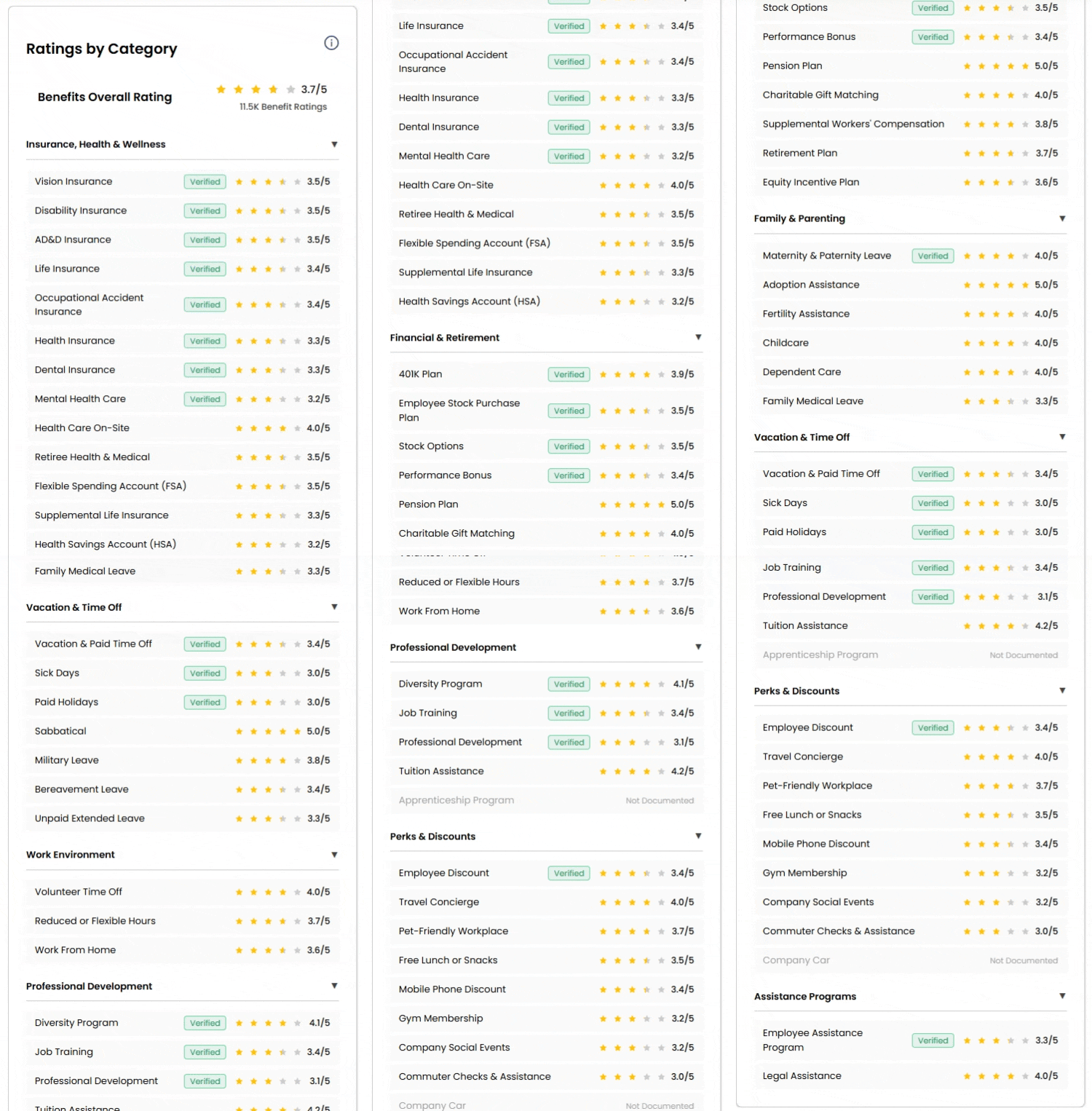
Benefeature Benefit Ratings tab on an employer profile, showing the overall rating, Ratings by Category, Benefits Summary, and Ratings by Demographic sourced from Glassdoor and matched onto the employer profile

Trusted by carriers, brokers, and vendors across the industry

Lincoln Financial Group
ShelterPoint
Mutual of Omaha
Prudential
The Hartford
Symetra
Principal
OneAmerica
Lincoln Financial Group
ShelterPoint
Mutual of Omaha
Prudential
The Hartford
Symetra
Principal
OneAmerica
Animated scroll through a Benefeature employer profile's Benefit Ratings tab — overall rating, Ratings by Category, Benefits Summary, Ratings by Demographic, Verified benefits, and Employee Reviews scrolling past in sequence on a single record next to the rest of the deal
Prepare

Walk Into Every Employer Conversation Already Briefed

Open an employer profile and the rating is next to the plan, the broker, the premium, and the contacts. No separate research pass. The numbers tell you which categories to lead on, the underlying reviews tell you how employees talk about them.

  • Overall plus every category: A single benefits rating, with scores across rated benefit categories so the conversation can land on the right pain.
  • Demographic cuts: Ratings by gender, race and ethnicity, and the other dimensions review volume supports.
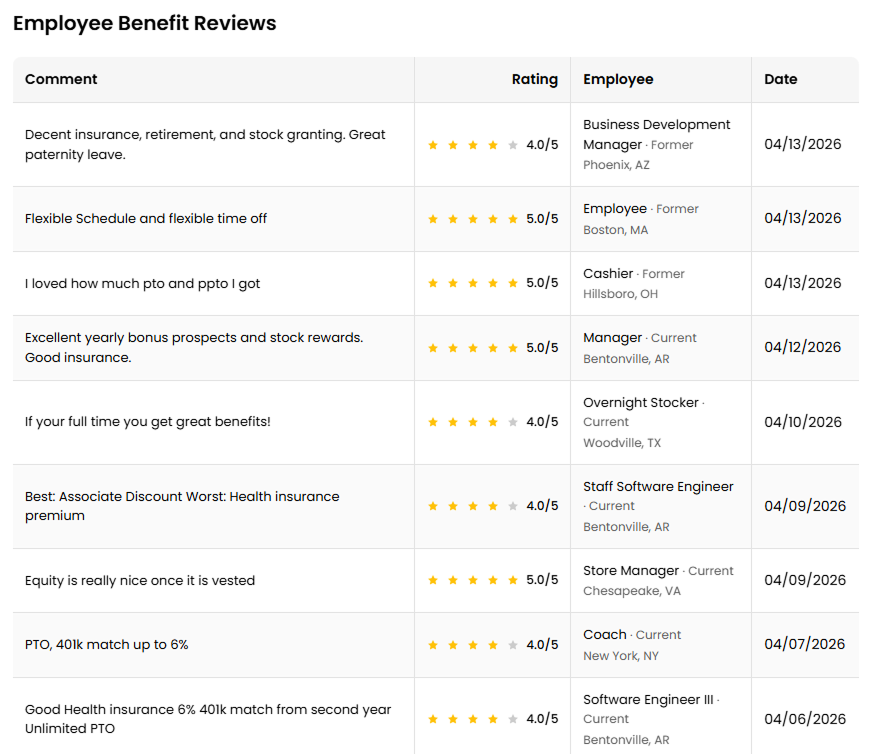
  • The reviews themselves: Employee reviews with rating, role, location, and date. The numbers are useful, the words sell.
See it on your accounts
Target

Spot the Books That Match How You Sell

Benefeature already matched every employer in the database to the broker agent, broker firm, and carrier that serves them. Benefit Ratings roll up across that book, so the aggregate rating for any entity sits one click away from the underlying employer list.
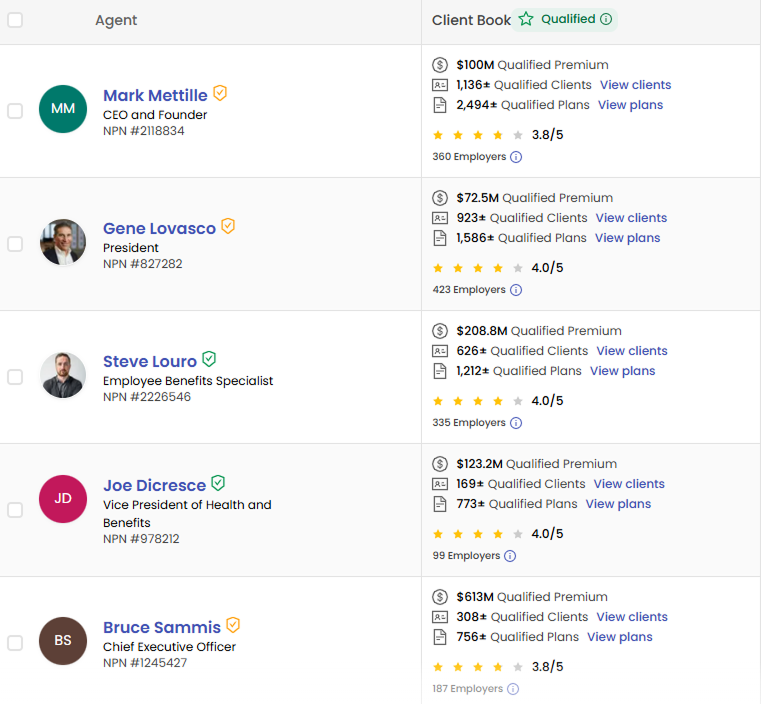
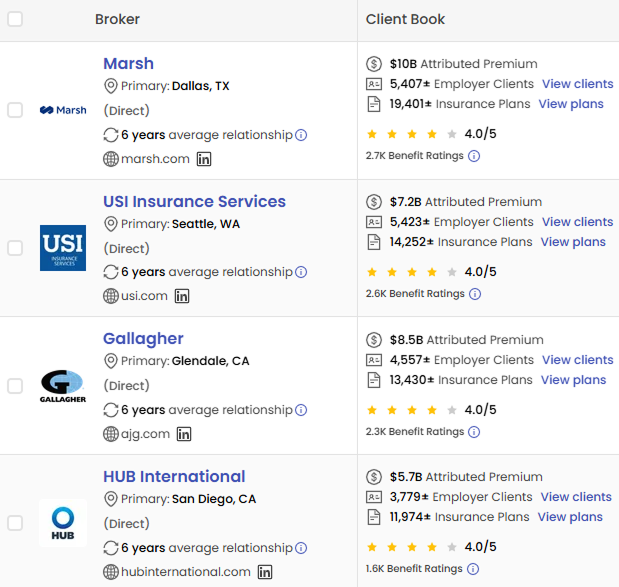
  • Aggregated by book of business
    A rolled-up Benefit Rating on every broker agent, broker firm, and carrier across the qualified employer book they hold.
  • Next to the rest of the record
    The aggregate sits beside book size, attributed premium, carrier mix, compensation benchmarks, and market presence.
  • Drill back down any time
    Click into the entity and you are on the underlying employer list — the same employers the aggregate rolled up from.
Broker Agents
Broker Agent search results in Benefeature showing producers Mark Mettille, Gene Lovasco, Steve Louro, Joe Dicresce, and Bruce Sammis — each with qualified premium, qualified clients, qualified plans, and the aggregated Benefit Rating across the employer book they serve
Broker Firms
Broker Firm search results in Benefeature showing Marsh, USI Insurance Services, Gallagher, and HUB International — each with attributed premium, employer client count, insurance plan count, and the aggregated Benefit Rating rolled up across their qualified employer book of business
Carriers
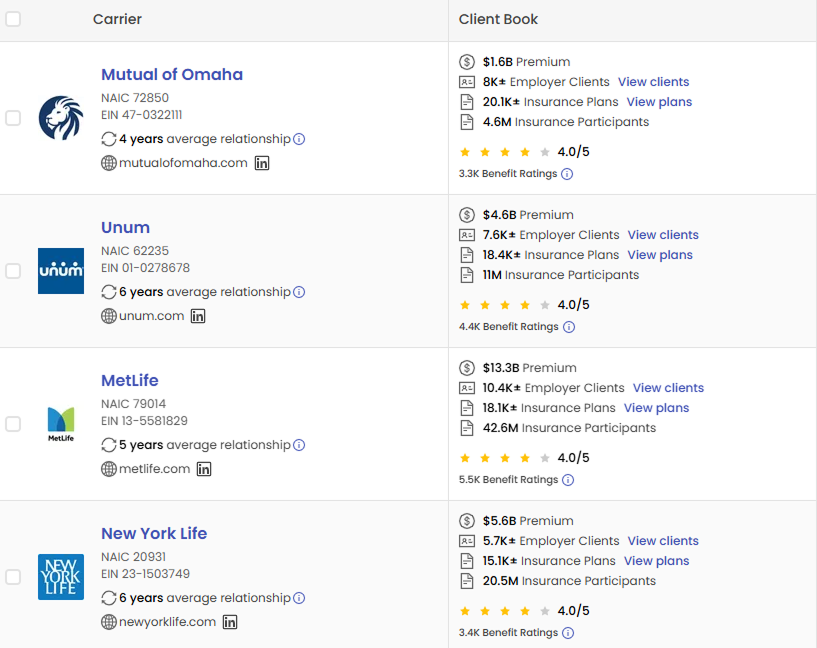
Carrier search results in Benefeature showing Mutual of Omaha, Unum, MetLife, and New York Life — each with premium, employer client count, insurance plan count, insurance participants, and the aggregated Benefit Rating rolled up across their employer book of business
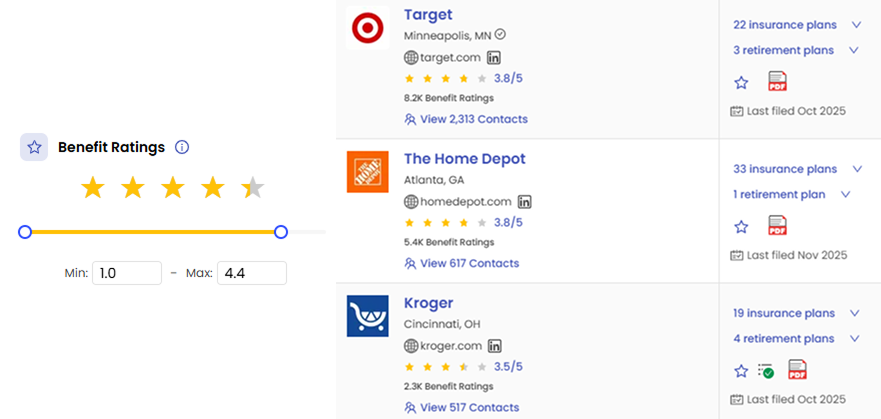
Benefeature employer search with the 1-5 star Benefit Ratings min/max filter applied — pares the employer result set down to employers inside the chosen rating band, with the overall star rating and Benefit Ratings count visible on every employer card
Employee Benefit Reviews on a Benefeature employer profile — individual Glassdoor reviews with star rating, employee role, location, and date, showing how the workforce talks about the benefits program
Build

Build a Pipeline From Real Pain, Not Firmographics Alone

Firmographics tell you who could buy. Sentiment tells you who needs to. Combine a 1–5 star Benefit Rating filter with every other filter in Benefeature — industry, geography, size, plan attributes, premium bands, broker relationships, compensation benchmarks — and the pipeline lands on employers or books where the pain you solve is real and current.

  • One filter, four entities: The same 1–5 star min/max filter applies to Employer, Broker Agent, Broker Firm, and Carrier search.
  • Combines with everything else: Stack it on industry, geography, plan attributes, premium bands, carrier mix, compensation benchmarks, and every other Benefeature filter.
  • Targets the gap you solve: Carriers find winnable renewals. Brokers find switching prospects. Vendors find ICP employers where their category lands weak.
Filter recipes
  • Rating min 4.0 + Industry = Tech → tech employers whose employees rate the program well.
  • Rating max 3.0 + Employee Count = 500–5,000 → mid-market switching shortlist.
  • Broker Firm aggregate min 4.0 + Top Carrier = MetLife → high-rated MetLife books.
See it on your accounts
The Intelligence Stack

Ratings at All Four Levels of the Stack

Benefeature is the Group Benefits Intelligence platform. Every employer profile packages plan data, carrier and broker relationship history, per-product premium and participation, retirement, employer contacts, and premium trends into one screen. The same intelligence rolls up to every broker agent, broker firm, and carrier in the database.

Benefit Ratings now sit at all four levels. On the employer profile, next to the plan. On the broker agent and firm views, next to the book of business. On the carrier view, next to attributed premium. Same searches, same filters, same screens.

That’s what makes the data operational. What employees say lands harder when it’s sitting next to the rest of the deal.

On the Employer Profile
Everything matched on one record
  • Benefit RatingsNew
  • Employer Contacts
  • Group Benefit Plans
  • Carrier & Broker Relationships
  • Per Product Premium & Participation
  • Retirement
  • Premium Trends

Same intelligence rolled up to every broker agent, broker firm, and carrier.

How Carriers, Brokers, and Vendors Put It to Work

Three audiences, three different plays, one record.

For Carriers

  • Shortlist broker partnerships by the ratings in their books
  • Benchmark your broker-of-record book against peer carriers
  • Surface competitor renewals where category ratings run weak
  • Layer ratings onto the same territory map as plan, premium, and broker data

For Brokers

  • Walk into every client review with a peer-comparison rating in hand
  • Catch a category sliding lower before it becomes a retention call
  • Prospect employers in your territory by the weakest rating gap
  • Recruit producers with a clear read on how their book is rated

For Vendors

  • Target employers whose employees rate your category low
  • Shortlist broker firms whose books concentrate the gap you solve
  • Sequence ABM around real, public-source rating signals
  • Validate ICP fit by category rating, not size and industry alone
What’s in the Data

Glassdoor Ratings, Structured for Group Benefits

The underlying signal is public. The structure is the work. Each covered employer carries an overall rating, ratings across eight benefit categories, demographic cuts, verified benefits where documented, and the underlying reviews themselves. Then the same data rolls up across every broker and carrier book that holds the employer.

0.0Kemployers covered as of , growing every release

Ratings by Category

Overall plus eight categories: Insurance/Health/Wellness, Financial/Retirement, Family/Parenting, Vacation/Time Off, Work Environment, Professional Development, Perks/Discounts, Assistance Programs.

Ratings by Demographic

Gender, race and ethnicity, and other dimensions where review volume supports it. Surface where the rating splits inside an employer’s population.

Verified Benefits

When the employer documents the benefit, a Verified badge appears next to the rating. Real coverage, real rating, side by side.

Employee Reviews

The underlying review comments with rating, role, location, and date. The numbers are useful, the words sell.

Availability

On Every Benefeature Tier

Pro, Pro Plus, and Enterprise all get the full dataset: every employer profile, broker agent, broker firm, and carrier where the rating exists.

See It on Your Own Accounts

Pick five employers you know well. We’ll show you their Benefit Ratings, the broker firms that hold them, and how the rating changes the conversation — all on the same employer profile where the plan, premium, and broker data already sit. Thirty minutes, your accounts.