Benefeature’s customers have always been able to see the employer side of the market: the company, the plan structure, the broker on the account, the premium and compensation data. What they have not been able to see, at scale, in one place, is the buying team inside that employer.
HR leaders, finance approvers, benefits owners, the supporting cast of HR and benefits staff. The people who actually move a benefits buying decision. Stitching these contacts together has been a separate research project: multiple tools, manual matching, lists that go stale within weeks.
Today we are launching Employer Contacts in Benefeature. 4M+ employer-side contacts, matched into employer profiles across Benefeature via a Benefits Decision Chain and a full HR & Benefits Team roster wherever we have the buying team matched. Coverage is significant and growing, and wherever we have it, the buying team now lives next to the rest of the deal data.
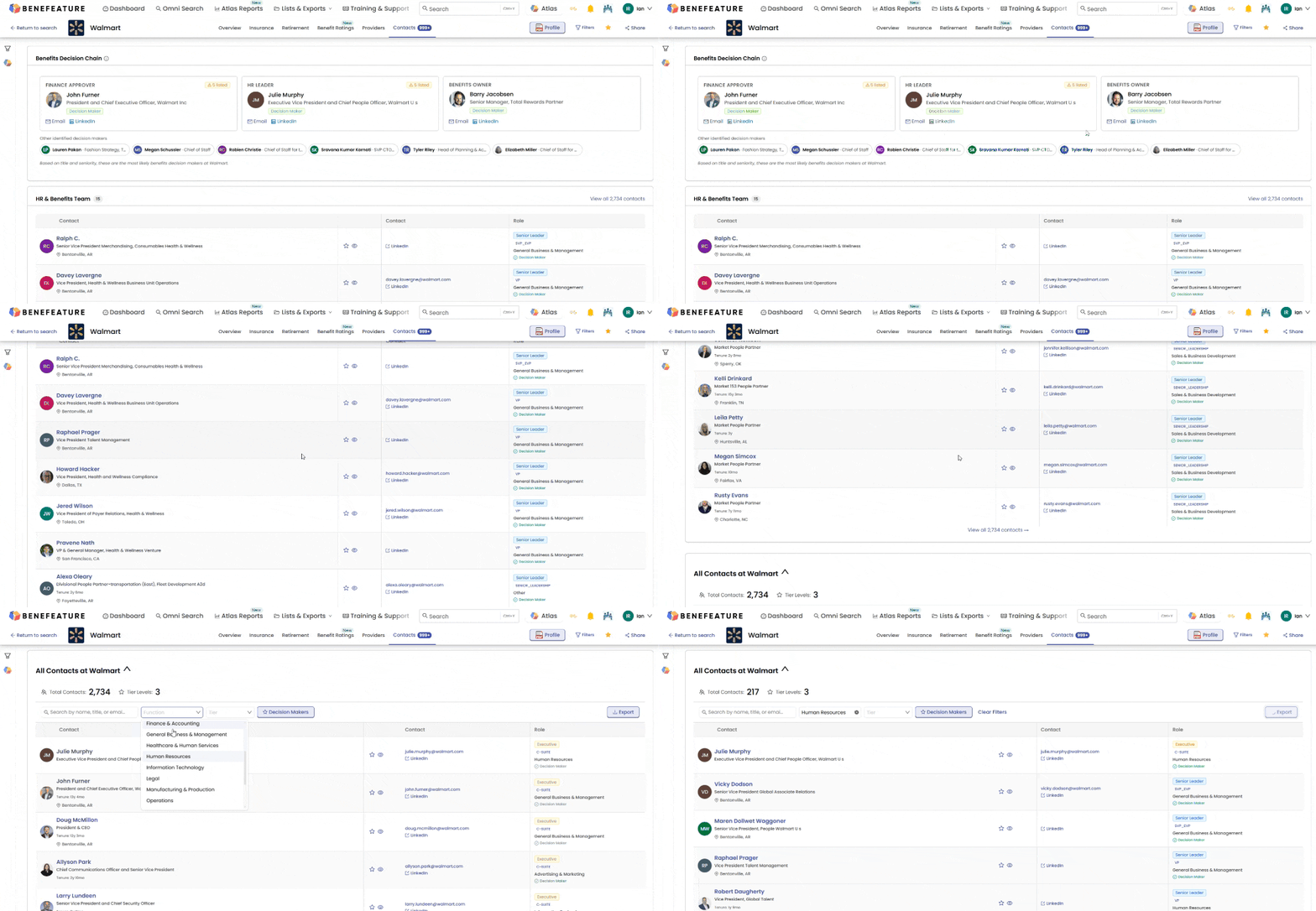
Wherever we have matched the buying team at an employer, the employer profile now includes two new sections that surface those contacts without leaving the record.
The Benefits Decision Chain is a curated four-role view of the people most likely to influence the benefits buying decision: the Finance Approver who signs off on spend, the HR Leader who owns the program, the Benefits Owner running the day-to-day, and any other identified decision makers outside those three roles. Each is matched to a real person with title, function, decision-maker status, and business email and LinkedIn profile shown when available.
Below the Decision Chain sits the HR & Benefits Team roster: every HR and benefits-adjacent contact we have matched at the employer, filterable by function and seniority. The Decision Chain is the short list. The roster is the full team. Pull whichever fits the conversation you are about to have.
A note on coverage: contacts appear wherever we have matched the buying team at an employer. Coverage is significant and growing, though it is not yet universal. Employers where we do not yet have matched contacts will not show the Decision Chain or HR & Benefits Team sections.
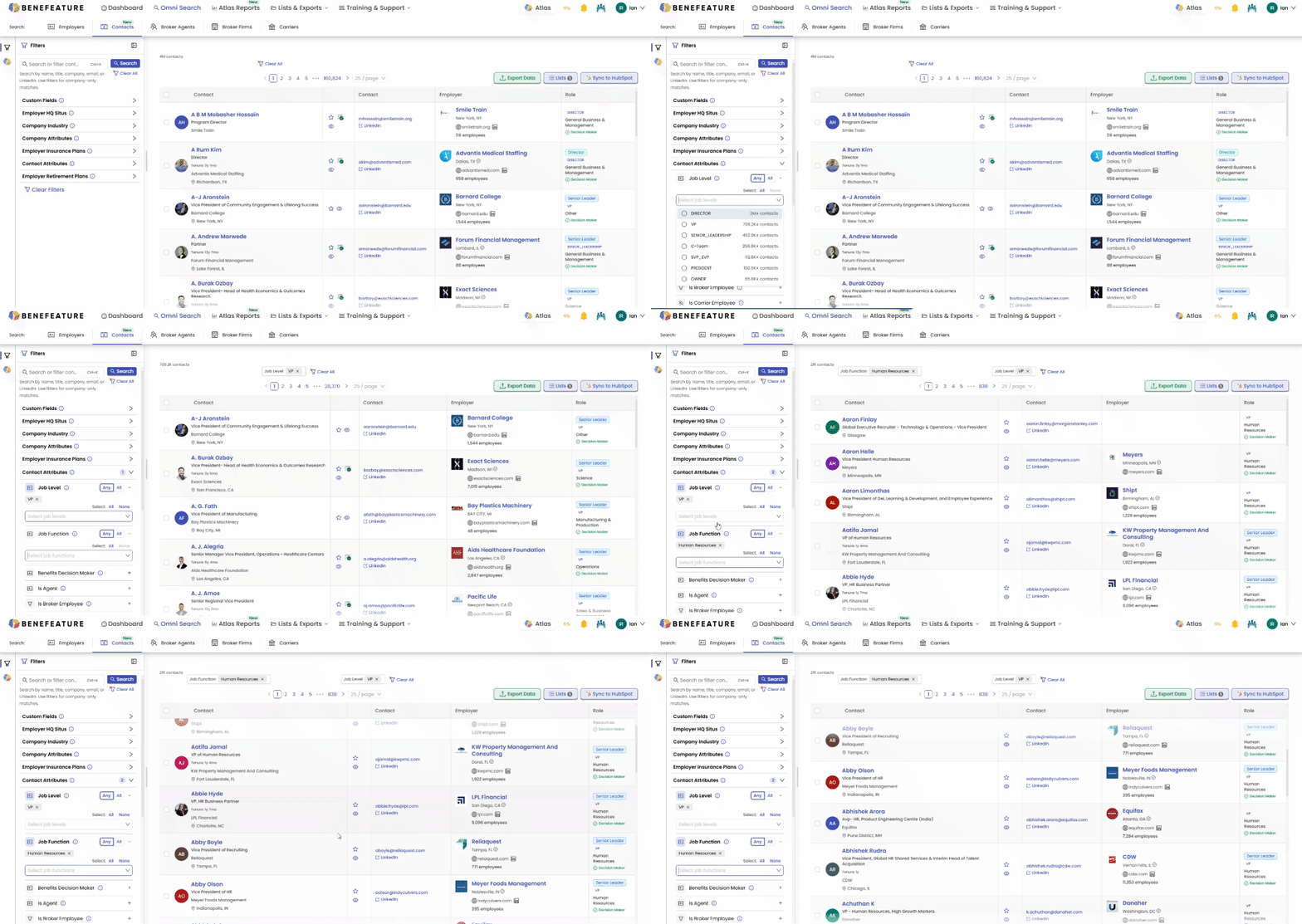
A new Contacts tab joins Employers, Broker Agents, Broker Firms, and Carriers in Omni Search. Filter across the full dataset by title, function, seniority, decision-maker status, industry, company attributes, and geography. Decision Maker badges sit on qualified cards so the people most likely to move a deal are visible at a glance.
What you do with the result is the part that matters. For now, export to Excel and pull matched contacts into your existing workflow. Native HubSpot CRM Integration and Smart Lists ship in the next release — Pro Plus will include 12,000 CRM syncs per year via Intelligence Credits, Enterprise unlimited.
Most benefits prospecting tools stop at the broker. That makes sense. The broker is the relationship that exists on paper. But the broker is rarely the only person who needs to be in the conversation when a benefits decision actually moves.
Our customers have been working around that gap for years. They stitch contact data together from three or four tools, then re-stitch it every time a list changes. The work is always in the gaps between the systems.
“The buying team should not be a separate research project. It should be part of the employer record.”
That is what Employer Contacts does. The data that defines a deal now lives next to the data that opens it. One platform, the full picture, in the same place you were already working.
To get started, log in to Benefeature and click the new Contacts tab in Omni Search. The full feature page lives at benefeature.com/employer-contacts.
Also shipping in this release: search improvements across Omni Search, a comprehensive dark mode refresh, and expanded Agent Licensing visibility on broker agent profiles.
Employer Contacts is the first of three releases in this series. Two more are on the way, and each will get its own announcement when it ships.
The evergreen feature page: search filters, dataset breakdown, tier availability, and use cases all in one place.
The companion piece: broker comp data at four levels with built-in benchmarking and 14 fee types.
Pro Plus includes Employer Contacts. CRM integrations with 12,000 syncs per year ship in the next release; Enterprise unlocks unlimited.
